Saturday, 18 August 2018

package govind;

import java.time.DayOfWeek;
import java.time.LocalDate;
import java.time.Month;


public class Java8TimeDateConcept {

public static void main(String[] args) {

        LocalDate today = LocalDate.now();
System.out.println("Today Date="+today);
int year = today.getYear();
int month = today.getMonthValue();
int day = today.getDayOfMonth();
DayOfWeek dayOfweek = today.getDayOfWeek();
Month month1 = today.getMonth();
int lm = today.lengthOfMonth();
int ly = today.lengthOfYear();
System.out.println("Year="+year);
System.out.println("Month="+month);
System.out.println("Day="+day);
System.out.println( "DayOfWeek="+dayOfweek);
System.out.println("Month="+month1);
System.out.println("Length of the Month="+lm);
System.out.println("Length of the Year="+ly);

}
}

o/p:------------------------------------------------------------------

Wednesday, 15 August 2018

//write a program  to create a Flag in java using applet?

// Flag.java
import java.applet.*;
import java.awt.*;
public class Flag extends Applet
{
public void paint(Graphics g)
{

g.drawLine(500,640,500,680);
g.drawRect(300,150,500,100);
g.setColor(Color.WHITE);
g.fillRect(300,150,500,100);
g.setColor(Color.BLUE);
g.drawString("Jai Hind Jai Maa Bharat",800,215);
g.drawRect(280,50,20,550);
g.setColor(Color.blue);
g.fillRect(280,50,20,550);
g.drawRect(200,600,200,40);
g.setColor(Color.blue);
g.fillRect(200,600,200,40);
g.drawRect(100,640,400,40);
g.setColor(Color.blue);
g.fillRect(100,640,400,40);

g.drawRect(300,50,500,100);
g.setColor(Color.ORANGE);
g.fillRect(300,50,500,100);
g.drawRect(300,250,500,100);
g.setColor(Color.GREEN);
g.fillRect(300,250,500,100);

g.drawLine(490,200,590,200);
g.setColor(Color.BLUE);

g.drawOval(490,150,100,100);
g.setColor(Color.BLUE);
g.drawLine(540,150,540,250);

g.drawLine(555,150,525,250);
g.drawLine(570,158,510,241);
g.drawLine(578,165,500,230);
g.drawLine(585,175,495,225);
g.drawLine(588,187,492,213) ;

g.drawLine(493,185,587,215);
g.drawLine(500,170,580,230);
g.drawLine(512,160,572,238);
g.drawLine(520,155,565,242);
g.drawLine(530,150,555,250);

}
}

//Flag.html

<html>
<head><title>First applet</title>
</head>
<body>
<applet code="Flag.class" width="100" height="500">
</applet>
</body>
</html>


O/p:----------------------------------------


Tuesday, 14 August 2018


How to write String in a file using BufferedWriter?

import java.io.BufferedWriter;
import java.io.FileWriter;
import java.io.IOException;

public class WriteToFileExample {


public static void main(String[] args) {

BufferedWriter bw = null;
FileWriter fw = null;

try {

String content = "victory has hundred fathers but defeat is orphan";

fw = new FileWriter("e:/govindbufferedwriterexample.txt");
bw = new BufferedWriter(fw);
bw.write(content);

System.out.println("File created successfully inside e folder and file name is govindbufferedwriterexample.txt and content is victory has hundred fathers but defeat is orphan ");

} catch (IOException e) {

e.printStackTrace();

} finally {

try {

if (bw != null)
bw.close();

if (fw != null)
fw.close();

} catch (IOException ex) {

ex.printStackTrace();

}

}

}

}


import java.io.BufferedWriter;
import java.io.FileWriter;
import java.io.IOException;

public class WriteToFileExampleTryWithResources {


public static void main(String[] args) {

try (BufferedWriter bw = new BufferedWriter(new FileWriter("e:/govind.txt"))) {

String content = "My name is khan";

bw.write(content);

// no need to close it.
//bw.close();

System.out.println("File created successfully in side e folder with govind.txt file and content is my name is khan");

} catch (IOException e) {

e.printStackTrace();

}

}

}


 BufferedWriter – Append


 append to end of file
FileWriter fw = new FileWriter(FILENAME, true);
BufferedWriter bw = new BufferedWriter(fw);

Monday, 13 August 2018

//How to read file content line by line in java?


import java.io.BufferedReader;
import java.io.FileNotFoundException;
import java.io.FileReader;
import java.io.IOException;

public class ReadLinesFromFile {

    public static void main(String a[ ]){
        BufferedReader br = null;
        String strLine = "";
        try {
            br = new BufferedReader( new FileReader("d:/govindjava.txt"));
                                                  //or
            //br = new BufferedReader( new FileReader("d:\\govindjava.txt"));
            while( (strLine = br.readLine()) != null){
                System.out.println(strLine);
            }
        } catch (FileNotFoundException e) {
            System.err.println("Unable to find the file: fileName");
        } catch (IOException e) {
            System.err.println("Unable to read the file: fileName");
        }
    }
}


//How to read file content line by line in java?(try with resources concept-java 7 concept)

import java.io.BufferedReader;
import java.io.FileReader;
import java.io.IOException;

public class ReadLinesFromFileJava7 {


public static void main(String[] args) {

try (BufferedReader br = new BufferedReader(new FileReader("d:/try-with-resources.txt"))) {

String  str=" ";

while ((str = br.readLine()) != null) {
System.out.println(str);
}

} catch (IOException e) {
e.printStackTrace();
}

}

}


Saturday, 11 August 2018

                                                                 try with resource concept:-


import java.io.BufferedReader;
import java.io.FileReader;
import java.io.IOException;

public class Example1 {

public static void main(String[] args) {

BufferedReader br = null;

try {

String line;

br = new BufferedReader(new FileReader("d:\\govind.txt"));

while ((line = br.readLine()) != null) {
System.out.println(line);
}

} catch (IOException e) {
e.printStackTrace();
} finally {
try {
if (br != null)br.close();
} catch (IOException ex) {
ex.printStackTrace();
}
}

}
}


import java.io.BufferedReader;
import java.io.FileReader;
import java.io.IOException;

public class Example2 {

public static void main(String[] args) {

try (BufferedReader br = new BufferedReader(new FileReader("d:\\govind.txt")))
{

String line;

while ((line = br.readLine()) != null) {
System.out.println(line);
}

} catch (IOException e) {
e.printStackTrace();
}

}
}


Wednesday, 1 August 2018


                                                                  jquery selector


1.select  element by id

<!DOCTYPE html>
    <html lang="en-US">
    <head>
        <title>HTML Tutorial</title>
        <script src="http://ajax.googleapis.com/ajax/libs/jquery/1.9.1/jquery.min.js"></script>
        <meta charset="windows-1252">
    <script>

    $(document).ready(function(){
        $("#submit").on("click", function(){
        var a = parseInt($('#istno').val());
        var b = parseInt($('#2ndno').val());
           var sum = a + b;
            alert("Sum="+ sum);
        })
    })
    </script>
    </head>
    <body>
       <input type="text" id="istno" name="option">
       <input type="text" id="2ndno" name="task">
    <input id="submit" type="button" value="press me">

    </body>

    </html>


===========================================================================================================================================
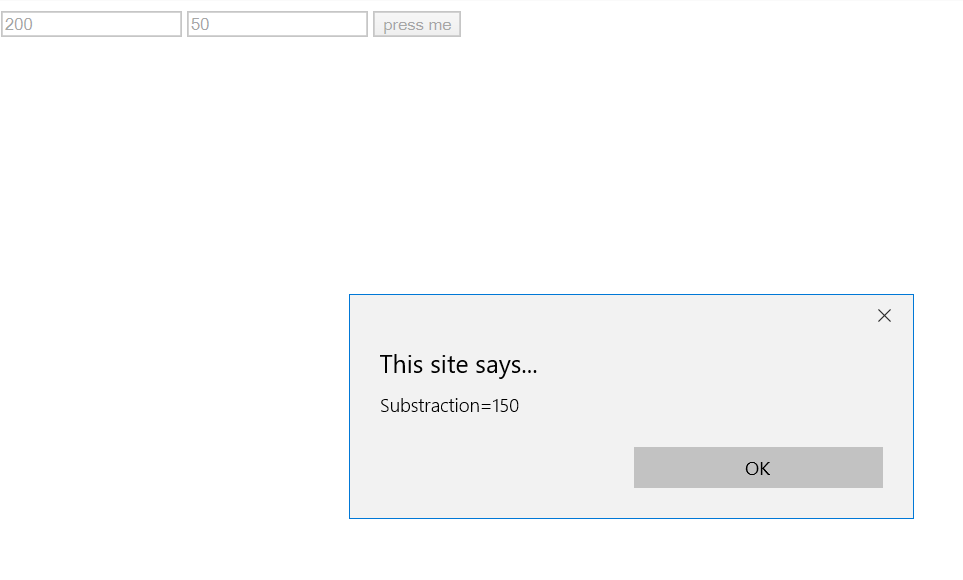
2.  select  element by class name


<!DOCTYPE html>
    <html lang="en-US">
    <head>
        <title>HTML Tutorial</title>
        <script src="http://ajax.googleapis.com/ajax/libs/jquery/1.9.1/jquery.min.js"></script>
        <meta charset="windows-1252">
    <script>

    $(document).ready(function(){
        $("#submit").on("click", function(){
        var a = parseInt($('.istno').val());
        var b = parseInt($('.2ndno').val());
           var sub= a - b;
            alert("Substraction="+ sub);
        })
    })
    </script>
    </head>
    <body>
       <input type="text" class="istno" name="option">
       <input type="text" class="2ndno" name="task">
    <input id="submit" type="button" value="press me">

    </body>

    </html>


                                                               jQuery Selectors

=======================================================================================================================================
Selecting an element by ID in jQuery
Selecting elements by class name in jQuery
Selecting elements by element name in jQuery
Selecting elements by attribute in jQuery
Selecting elements by compound CSS selector in jQuery
Selecting elements by jQuery custom selector
===========================================================================================================================================
<!DOCTYPE html>
<html lang="en">
<head>
<meta charset="utf-8">
<title>jQuery Select Element by ID</title>
<script src="https://code.jquery.com/jquery-1.12.4.min.js"></script>
<script type="text/javascript">
$(document).ready(function(){
    // Highlight element with id mark
    $("#mark").css("background", "blue");
});
</script>
</head>
<body>
    <p id="mark">Govind Ballabh Khan.</p>
    <p>My name is khan.</p>
    <p>Khan is my title but i am maithil brahmin</p>
    <p><strong>Note:</strong> The value of the id attribute must be unique in an HTML document.</p>
</body>
</html>                           


=========================================================================================================================================

<!DOCTYPE html>
<html lang="en">
<head>
<meta charset="utf-8">
<title>jQuery Select Element by Class</title>
<script src="https://code.jquery.com/jquery-1.12.4.min.js"></script>
<script type="text/javascript">
$(document).ready(function(){
    // Highlight elements with class mark
    $(".mark").css("background", "yellow");
});
</script>
</head>
<body>
     <p class="mark">Govind Ballabh Khan.</p>
     <p class="mark">My name is khan.</p>
    <p>Khan is my title but i am maithil brahmin</p>
</body>
</html> 

==========================================================================================================================================


<!DOCTYPE html>
<html lang="en">
<head>
<meta charset="utf-8">
<title>jQuery Select Element by Name</title>
<script src="https://code.jquery.com/jquery-1.12.4.min.js"></script>
<script type="text/javascript">
$(document).ready(function(){
    // Highlight paragraph elements
    $("p").css("background", "red");
});
</script>
</head>
<body>
    <h1>Govind Ballabh Khan.</h1>
    <p>My name is khan.</p>
    <p>Khan is my title but i am maithil brahmin</p>

</body>
</html>


===========================================================================================================================================

<!DOCTYPE html>
<html lang="en">
<head>
<meta charset="utf-8">
<title>jQuery Select Element by Attribute</title>
<script src="https://code.jquery.com/jquery-1.12.4.min.js"></script>
<script type="text/javascript">
$(document).ready(function(){
    // Highlight paragraph elements
    $('input[type="text"]').css("background", "yellow");
    $('input[type="password"]').css("background", "blue");
});
</script>
</head>
<body>
    <form>
        <label>Name: <input type="text"></label>
        <label>Password: <input type="password"></label>
        <input type="submit" value="Sign In">
    </form>
</body>
</html>


===========================================================================================================================================


<!DOCTYPE html>
<html lang="en">
<head>
<meta charset="utf-8">
<title>jQuery Select Element by Compound Selector</title>
<script src="https://code.jquery.com/jquery-1.12.4.min.js"></script>
<script type="text/javascript">
$(document).ready(function(){

    // Highlight li elements inside the ul elements
    $("ul li").css("background", "yellow");
 
    // Highlight li elements only inside the ul element with id mark
    $("ul#mark li").css("background", "red");
 
    // Highlight li elements inside all the ul element with class mark
    $("ul.mark li").css("background", "green");
 
   
});
</script>
</head>
<body>
    <p>This is a paragraph.</p>
    <p>This is another paragraph.</p>
    <p>This is one more paragraph.</p>
    <ul>
        <li>mango</li>
        <li>mango</li>
        <li>mango</li>
    </ul>
    <ul id="mark">
        <li>apple</li>
        <li>apple</li>
        <li>apple</li>
    </ul>
    <ul class="mark">
        <li>orange</li>
        <li>orange</li>
        <li>orange</li>
    </ul>
   
</body>
</html>                           


==========================================================================================================================================

<!DOCTYPE html>
<html lang="en">
<head>
<meta charset="utf-8">
<title>jQuery Custom Selector</title>
<style type="text/css">
    /* Some custom style */
    *{
        padding: 5px;
    }
</style>
<script src="https://code.jquery.com/jquery-1.12.4.min.js"></script>
<script type="text/javascript">
$(document).ready(function(){
    // Highlight table rows appearing at odd places
    $("tr:odd").css("background", "yellow");
 
    // Highlight table rows appearing at even places
    $("tr:even").css("background", "orange");
 
    // Highlight first paragraph element
    $("p:first").css("background", "red");
 
    // Highlight last paragraph element
    $("p:last").css("background", "green");
 
    // Highlight all input elements with type text inside a form
    $("form :text").css("background", "purple");
 
    // Highlight all input elements with type password inside a form
    $("form :password").css("background", "blue");
 
    // Highlight all input elements with type submit inside a form
    $("form :submit").css("background", "violet");
});
</script>
</head>
<body>
    <table border="1">
        <thead>
            <tr>
                <th>No.</th>
                <th>Name</th>
                <th>Email</th>
            </tr>
        </thead>
        <tbody>
            <tr>
                <td>1</td>
                <td>Govind Ballabh Khan</td>
                <td>govindkhan@mail.com</td>
            </tr>
            <tr>
                <td>2</td>
                <td>sanjay</td>
                <td>sanjay@mail.com</td>
            </tr>
            <tr>
                <td>3</td>
                <td>Dinesh</td>
                <td>dinesdh@gmail.com</td>
            </tr>
        </tbody>
    </table>
    <p>Govind Ballabh Khan.</p>
    <p>My Name is khan</p>
    <p>I am not muslim i am maithil brahmin</p>
    <form>
        <label>Name: <input type="text"></label>
        <label>Password: <input type="password"></label>
        <input type="submit" value="Sign In">
    </form>
</body>
</html>                           


=========================================================================================================================================