Saturday, 9 March 2019

How To Count Occurrences Of Each Character In String In Java?


package govind_java;

import java.util.HashMap;
import java.util.Map;

public class EachCharacterCountInString {
public static void eachCharCountInString(String str)
{
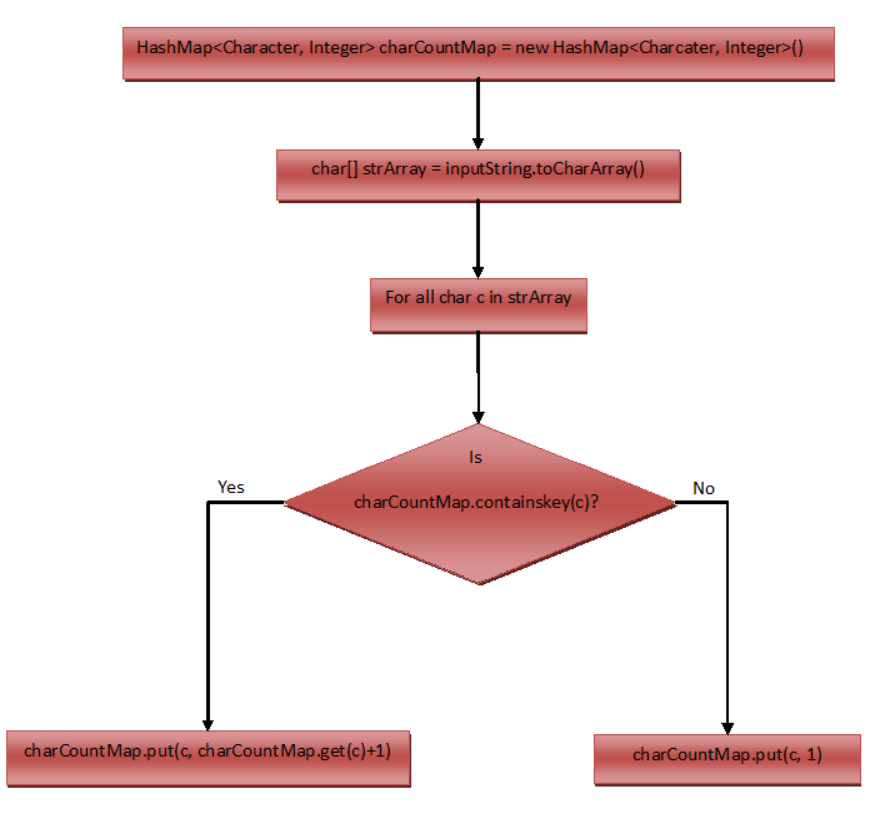
   //Creating a HashMap, key :Character  value : occurrences as Integer
Map<Character, Integer> map=new HashMap<>();
 //Converting inputString to char array
char[] kk = str.toCharArray();

        //traversal of each Character of charArray
for(char t:kk)
{
if(map.containsKey(t))
{
    //If char is present in map, increment count by 1
map.put(t, map.get(t)+1);
}
else
{
 //If char is not present in map,
                //Putting this char to map with 1 as it's initial value
 
              map.put(t, 1);
            }
        }
System.out.println(map);
}
public static void main(String[] args) {
EachCharacterCountInString.eachCharCountInString("javatechnology");
}

}


o/p:----------------------------
{a=2, c=1, t=1, e=1, v=1, g=1, h=1, y=1, j=1, l=1, n=1, o=2}


How To Find Duplicate Characters In A String In Java?


package govind_java;

import java.util.HashMap;
import java.util.LinkedHashMap;
import java.util.Map;
import java.util.Map.Entry;
import java.util.Set;

public class DuplicateCharacterInString {
public static void duplicateCharacterInString(String str)
{
Map<Character, Integer> map=new LinkedHashMap<>();
char[] kk = str.toCharArray();
for(char ch:kk)
{
if(map.containsKey(ch))
{
map.put(ch, map.get(ch)+1);
}
else
{
map.put(ch, 1);
}
}
Set<Character> keyset = map.keySet();
System.out.println(keyset);
for(Character ch:keyset)
{
if(map.get(ch)>1)
{
System.out.println(ch +" : "+ map.get(ch));
}
}
}
public static void main(String[] args) {
DuplicateCharacterInString .duplicateCharacterInString("javatechnology");
}

}


o/p:------------------


[j, a, v, t, e, c, h, n, o, l, g, y]
a : 2
o : 2


Ist approach:-

package govind_java;

public class GetFirstNonRepeatingCharacterInString {
public static Character getFirstNonRepeatingCharacterInString(String str)
{
char[] ch = str.toCharArray();
for(int i=0;i<ch.length;i++)
{
if(str.lastIndexOf(ch[i])==str.indexOf(ch[i]))
return ch[i];
}
return null;
}
public static void main(String[] args) {
Character t = GetFirstNonRepeatingCharacterInString.getFirstNonRepeatingCharacterInString("javatechnology");
    System.out.println(t);
}

}


o/p:-------------

j

2nd approach:-
package govind_java;

import java.util.HashMap;
import java.util.LinkedHashMap;
import java.util.Map;
import java.util.Map.Entry;


public class GetFirstNonRepeatingCharThroughMap {
public static Character getFirstNonRepeatingCharThroughMap(String str)
{
Map<Character, Integer> map=new LinkedHashMap<>();
char[] kk = str.toCharArray();
for(char ch:kk)
{
if(!map.containsKey(ch))
{
map.put(ch,1 );
}
else
{
map.put(ch,map.get(ch)+1);
}
}
for(Entry<Character, Integer> cc:map.entrySet())
{
if(cc.getValue()==1)
return cc.getKey();
}
return null;
}
public static void main(String[] args) {
Character mmm = GetFirstNonRepeatingCharThroughMap.getFirstNonRepeatingCharThroughMap("javatechnology");
System.out.println("First Non Repeating Char="+mmm);
}

}


o/p:---------------------------------------------------
First Non Repeating Char=j


Wap to find all substring in java?


package govind_java;

public class FindAllSubStringInJava {
public void findAllSubStringInJava(String str)
{
for(int i=0;i<str.length();i++)
{
for(int j=i+1;j<=str.length();j++)
{
System.out.println(str.substring(i,j));
}
}
}
public static void main(String[] args) {
FindAllSubStringInJava fasj=new FindAllSubStringInJava();
fasj.findAllSubStringInJava("javatechnology");
}

}


o/p:---------------

j
ja
jav
java
javat
javate
javatec
javatech
javatechn
javatechno
javatechnol
javatechnolo
javatechnolog
javatechnology
a
av
ava
avat
avate
avatec
avatech
avatechn
avatechno
avatechnol
avatechnolo
avatechnolog
avatechnology
v
va
vat
vate
vatec
vatech
vatechn
vatechno
vatechnol
vatechnolo
vatechnolog
vatechnology
a
at
ate
atec
atech
atechn
atechno
atechnol
atechnolo
atechnolog
atechnology
t
te
tec
tech
techn
techno
technol
technolo
technolog
technology
e
ec
ech
echn
echno
echnol
echnolo
echnolog
echnology
c
ch
chn
chno
chnol
chnolo
chnolog
chnology
h
hn
hno
hnol
hnolo
hnolog
hnology
n
no
nol
nolo
nolog
nology
o
ol
olo
olog
ology
l
lo
log
logy
o
og
ogy
g
gy
y


Wap to check string is anagram or not?

package govind_java;

import java.util.Arrays;

public class AnagramProgram
{
    static void isAnagram(String s1, String s2)
    {
        //Removing all white spaces from s1 and s2
 
        String copyOfs1 = s1.replaceAll("\\s", "");
 
        String copyOfs2 = s2.replaceAll("\\s", "");
 
        //Initially setting status as true
 
        boolean status = true;
 
        if(copyOfs1.length() != copyOfs2.length())
        {
            //Setting status as false if copyOfs1 and copyOfs2 doesn't have same length
 
            status = false;
        }
        else
        {
            //Changing the case of characters of both copyOfs1 and copyOfs2 and converting them to char array
 
            char[] s1Array = copyOfs1.toLowerCase().toCharArray();
 
            char[] s2Array = copyOfs2.toLowerCase().toCharArray();
 
            //Sorting both s1Array and s2Array
 
            Arrays.sort(s1Array);
 
            Arrays.sort(s2Array);
 
            //Checking whether s1Array and s2Array are equal
 
            status = Arrays.equals(s1Array, s2Array);
        }
 
        //Output
 
        if(status)
        {
            System.out.println(s1+" and "+s2+" are anagrams");
        }
        else
        {
            System.out.println(s1+" and "+s2+" are not anagrams");
        }
    }
 
    public static void main(String[] args)
    {
        isAnagram("Mother In Law", "Hitler Woman");
 
        isAnagram("keEp", "peeK");
 
        isAnagram("SiLeNt CAT", "LisTen AcT");
 
        isAnagram("Debit Card", "Bad Credit");
 
        isAnagram("School MASTER", "The ClassROOM");
 
        isAnagram("DORMITORY", "Dirty Room");
 
        isAnagram("ASTRONOMERS", "NO MORE STARS");
 
        isAnagram("Toss", "Shot");
 
        isAnagram("joy", "enjoy");
    }
}


o/p:----------------

Mother In Law and Hitler Woman are anagrams
keEp and peeK are anagrams
SiLeNt CAT and LisTen AcT are anagrams
Debit Card and Bad Credit are anagrams
School MASTER and The ClassROOM are anagrams
DORMITORY and Dirty Room are anagrams
ASTRONOMERS and NO MORE STARS are anagrams
Toss and Shot are not anagrams
joy and enjoy are not anagrams


Wap to reverse each word in string in java ?

package govind_java;

public class ReverseEachWordInString {

public void reverseEachWordInString(String str)
{
String[] kk = str.split(" ");
for(String t:kk)
{
System.out.println(t);
//Ist Way
/*StringBuilder sb=new StringBuilder(t);
sb.reverse();
System.out.print(sb);*/
//2nd way
String reverse="";
char[] ch = t.toCharArray();
for(int i=ch.length-1;i>=0;i--)
{
reverse=reverse+ch[i];
}
System.out.println(reverse);
}
}
public static void main(String[] args) {
ReverseEachWordInString rews=new ReverseEachWordInString();
rews.reverseEachWordInString("Govind Ballabh khan");
rews.reverseEachWordInString("java Technology");
}
}


o/p:-----------------

Govind
dnivoG
Ballabh
hballaB
khan
nahk
java
avaj
Technology
ygolonhceT


Wap to reverse string in java ?


package govind_java;

public class ReverseString {
public static String reverseString(String str)
{
char[] kk = str.toCharArray();
String reverse="";
for(int i=kk.length-1;i>=0;i--)
{
reverse=reverse+kk[i];
}
return reverse;
}

public static void main(String[] args) {
String yy = reverseString("java technology");
System.out.println("Reverse String="+yy);
}
}


o/p:--------------


Reverse String=ygolonhcet avaj


Sunday, 24 February 2019

Marshalling And UnMarshalling in java


Explanation:Marshalling
As I told u earlier, to convert Java Object into an XML Document we are going to use JAXB API. Let’s see the steps to convert Java Object to XML (Marshalling using JAXB API).
Annotate the Java class with
@XmlRootElement annotation
Create a JAXBContext instance
JAXBContext context = JAXBContext.newInstance(Product.class);
Create a Marshaller reference with the help of JAXBContext instance by calling createMarshaller() method.
Marshaller marshaller = context.createMarshaller();
Creating XML object with the help of marshaller reference by calling marshal() method.
marshaller.marshal(Product, System.out);
Explanation:-UnMarshalling
Let’s see the steps to convert XML Object to Java (Unmarshalling using JAXB API)
Create a JAXBContext instance
JAXBContext context = JAXBContext.newInstance(Product.class);
Create a Unmarshaller reference with the help of JAXBContext instance by calling createUnmarshaller() method.
Unmarshaller unmarshaller = context.createUnmarshaller();
Creating Java Object with the help of unmarshaller reference by calling unmarshal() method.
Employee unmarshalledEmployee =(Product)unmarshaller.unmarshal(new File(“Product.xml”));


package govind; import javax.xml.bind.annotation.XmlAttribute; import javax.xml.bind.annotation.XmlElement; import javax.xml.bind.annotation.XmlRootElement; Product.java ProductObjectToXml.java ProductXmlToObject.java MarshallingUnmarshallingMain.java ================================================================================================================================ @XmlRootElement public class Product { private int productId; private String ProductName; private float price; public Product() { } @XmlAttribute public int getProductId() { return productId; } public void setProductId(int productId) { this.productId = productId; } @XmlElement public String getProductName() { return ProductName; } public void setProductName(String productName) { ProductName = productName; } @XmlElement public float getPrice() { return price; } public void setPrice(float price) { this.price = price; } public Product(int productId, String productName, float price) { super(); this.productId = productId; ProductName = productName; this.price = price; } } =============================================================================================================================== package govind; import java.io.File; import java.io.FileNotFoundException; import java.io.FileOutputStream; import javax.xml.bind.JAXBContext; import javax.xml.bind.JAXBException; import javax.xml.bind.Marshaller; public class ProductObjectToXml { public void marshallProductData() { try { JAXBContext jaxbcontext = JAXBContext.newInstance(Product.class); Marshaller marshaller = jaxbcontext.createMarshaller(); marshaller.setProperty(Marshaller.JAXB_FORMATTED_OUTPUT,true); Product p1=new Product(1001, "Laptop", 45000.0f); marshaller.marshal(p1,new FileOutputStream("product.xml")); marshaller.marshal(p1, System.out); System.out.println("Marshalling SuccessFully"); } catch (JAXBException | FileNotFoundException e) { e.printStackTrace(); } } } ============================================================================================================================ package govind; import java.io.File; import javax.xml.bind.JAXBContext; import javax.xml.bind.JAXBException; import javax.xml.bind.Unmarshaller; public class ProductXmlToObject { public void unmarshallProductData() { try { File f=new File("product.xml"); JAXBContext jaxbcontext = JAXBContext.newInstance(Product.class); Unmarshaller unmarshaller = jaxbcontext.createUnmarshaller(); Product p1 = (Product)unmarshaller.unmarshal(f); System.out.println(p1.getProductId()+" "+p1.getProductName()+" "+p1.getPrice()); System.out.println("Unmarshalling Successfully"); } catch (JAXBException e) { e.printStackTrace(); } } } =============================================================================================================================== package govind; public class MarshallingUnmarshallingMain { public static void main(String[] args) { ProductObjectToXml p1=new ProductObjectToXml(); p1.marshallProductData(); ProductXmlToObject p2=new ProductXmlToObject(); p2.unmarshallProductData(); } } o/p:------------------------ <?xml version="1.0" encoding="UTF-8" standalone="yes"?> <product productId="1001"> <price>45000.0</price> <productName>Laptop</productName> </product> Marshalling SuccessFully 1001 Laptop 45000.0 Unmarshalling Successfully

Saturday, 23 February 2019

                                          Marshalling And UnMarshalling Process in java?
====================================================================================================
In this Introduction of JAXB tutorial, we are going to see about JAXB annotation and concepts. JAXB means “Java Architecture for XML Binding”. This JAXB API makes developers life easy for converting “XML Document to Java Object” (Marshalling) and “Java Object to an XML document” (Unmarshalling). Before JAXB came into picture, developers might use different parsers (like SAX Parser) to parse entire XML document by reading all the elements from top to bottom along with the xml attributes and finally form an Java Object. But when JAXB came, it really saves lot of time for parsing the XML Document.
Before going to see about JAXB annotation, we will first see the concepts behind this JAXB annotation. JAXB basically works on the principle of Marshalling and Unmarshalling.
Marshalling – The process of converting Java Object into XML document or JSON Object.
Unmarshalling – The process of reconverting the XML document or JSON object into Java Object.
Before discussing about different annotations in JAXB API in this blog we will see the basic example of JAXB – Marshalling and Unmarshalling.
==============================================================
Explanation:Marshalling
As I told u earlier, to convert Java Object into an XML Document we are going to use JAXB API. Let’s see the steps to convert Java Object to XML (Marshalling using JAXB API).
Annotate the Java class with
@XmlRootElement annotation
Create a JAXBContext instance
JAXBContext context = JAXBContext.newInstance(Employee.class);
Create a Marshaller reference with the help of JAXBContext instance by calling createMarshaller() method.
Marshaller marshaller = context.createMarshaller();
Creating XML object with the help of marshaller reference by calling marshal() method.
marshaller.marshal(employee, System.out);
Explanation:-UnMarshalling
Let’s see the steps to convert XML Object to Java (Unmarshalling using JAXB API)
Create a JAXBContext instance
JAXBContext context = JAXBContext.newInstance(Employee.class);
Create a Unmarshaller reference with the help of JAXBContext instance by calling createUnmarshaller() method.
Unmarshaller unmarshaller = context.createUnmarshaller();
Creating Java Object with the help of unmarshaller reference by calling unmarshal() method.
Employee unmarshalledEmployee =(Employee)unmarshaller.unmarshal(new File(“employee.xml”));
package govind;
import javax.xml.bind.annotation.XmlAttribute;
import javax.xml.bind.annotation.XmlElement;
import javax.xml.bind.annotation.XmlRootElement;
@XmlRootElement
public class Employee {
private int id;
private String name;
private Float salary;
@XmlAttribute
public int getId() {
return id;
}
public void setId(int id) {
this.id = id;
}
@XmlElement
public String getName() {
return name;
}
public void setName(String name) {
this.name = name;
}
@XmlElement
public Float getSalary() {
return salary;
}
public void setSalary(Float salary) {
this.salary = salary;
}
}
==============================================================================================================================
package govind;
import java.io.FileNotFoundException;
import java.io.FileOutputStream;
import javax.xml.bind.JAXBContext;
import javax.xml.bind.JAXBException;
import javax.xml.bind.Marshaller;
public class EmployeeObjectToXml {
public static void main(String[] args) throws JAXBException, FileNotFoundException {
JAXBContext jaxbcontextobj = JAXBContext.newInstance(Employee.class);
Marshaller marshalobj = jaxbcontextobj.createMarshaller();
marshalobj.setProperty(Marshaller.JAXB_FORMATTED_OUTPUT,true);
Employee e1=new Employee();
e1.setId(1);
e1.setName("Govind Ballabh Khan");
e1.setSalary(10000.00f);
marshalobj.marshal(e1, new FileOutputStream("employee.xml"));
}
}
================================================================================================================================
package govind;
import java.io.File;
import javax.xml.bind.JAXBContext;
import javax.xml.bind.JAXBException;
import javax.xml.bind.Unmarshaller;
public class EmployeeXmlToObject {
public static void main(String[] args) {
try
{
File f=new File("employee.xml");
JAXBContext jaxbcontext=JAXBContext.newInstance(Employee.class);
Unmarshaller unmarshalobj = jaxbcontext.createUnmarshaller();
Employee e1 = (Employee)unmarshalobj.unmarshal(f);
System.out.println("Id="+e1.getId()+" Name"+e1.getName()+" Salary="+e1.getSalary());
}
catch (JAXBException e) {
e.printStackTrace();
}
}

}
o/p:-----------------
Marshalling
<?xml version="1.0" encoding="UTF-8" standalone="yes"?>
<employee id="1">
<name>Govind Ballabh Khan</name>
<salary>10000.0</salary>
</employee>
Unmarshalling
Id=1 NameGovind Ballabh Khan Salary=10000.0

Saturday, 16 February 2019


How Many Ways to create Object in java?


public class NewKeywordExample
{
    String name = "JavaTechnology";
    public static void main(String[] args)
    {
        NewKeywordExample obj = new NewKeywordExample();
        System.out.println(obj.name);
    }
}


===================================================================================


public class NewInstanceExample
{
    String name = "JavaTechnology";
    public static void main(String[] args)
    {
        try
        {
            Class cls = Class.forName("NewInstanceExample");
            NewInstanceExample obj =
                    (NewInstanceExample) cls.newInstance();
            System.out.println(obj.name);
        }
        catch (ClassNotFoundException e)
        {
            e.printStackTrace();
       }
        catch (InstantiationException e)
        {
            e.printStackTrace();
        }
        catch (IllegalAccessException e)
        {
            e.printStackTrace();
        }
    }
}


=======================================================================================


public class CloneExample implements Cloneable
{
    @Override
    protected Object clone() throws CloneNotSupportedException
    {
        return super.clone();
    }
    String name = "JavaTechnology";
    public static void main(String[] args)
    {
        CloneExample obj1 = new CloneExample();
        try
        {
            CloneExample obj2 = (CloneExample) obj1.clone();
            System.out.println(obj2.name);
        }
        catch (CloneNotSupportedException e)
        {
            e.printStackTrace();
        }
    }
}


===============================================================================================


import java.lang.reflect.*;
public class ReflectionExample
{
    private String name;
    ReflectionExample()
    {
    }
    public void setName(String name)
    {
        this.name = name;
    }
    public static void main(String[] args)
    {
        try
        {
            Constructor<ReflectionExample> constructor
                = ReflectionExample.class.getDeclaredConstructor();
            ReflectionExample r = constructor.newInstance();
            r.setName("JavaTechnology");
            System.out.println(r.name);
        }
        catch (Exception e)
        {
            e.printStackTrace();
        }
    }
}


=============================================================================================================


import java.io.*;
class DeserializationExampleTest implements Serializable
{
    private String name;
    DeserializationExampleTest (String name)
    {
        this.name = name;
    }
    public static void main(String[] args)
    {
        try
        {
            DeserializationExampleTest d =
                    new DeserializationExampleTest("JavaTechnology");
            FileOutputStream f = new FileOutputStream("file.txt");
            ObjectOutputStream oos = new ObjectOutputStream(f);
            oos.writeObject(d);
            System.out.println("Data Write Successfully");
            oos.close();
            f.close();
        }
        catch (Exception e)
        {
            e.printStackTrace();
        }

    DeserializationExampleTest d=null;
        try
        {
            FileInputStream f = new FileInputStream("file.txt");
            ObjectInputStream ois = new ObjectInputStream(f);
            d = (DeserializationExampleTest)ois.readObject();
 
        }
        catch (Exception e)
        {
            e.printStackTrace();
        }
        System.out.println(d.name);
    }


=======================================================================================================

Wednesday, 6 February 2019


                                                 java.lang.NullPointerException


NullPointerException is a runtime exception, so we don’t need to catch it in program. NullPointerException is raised in an application when we are trying to do some operation on null where an object is required. Some of the common reasons for NullPointerException in java programs are;
  1. Invoking a method on an object instance but at runtime the object is null.
  2. Accessing variables of an object instance that is null at runtime.
  3. Throwing null in the program
  4. Accessing index or modifying value of an index of an array that is null
  5. Checking length of an array that is null at runtime.

case:-1 NullPointerException when calling instance method
public class TestNullPointer {

public static void main(String[] args) {

TestNullPointer t = marJava();

t.mitJava("nam tere kar java");

}

private static TestNullPointer marJava() {
return null;
}

public void mitJava(String s) {
System.out.println(s.toLowerCase());
}
}


===========================================================================================================================
case:-2 Java NullPointerException while accessing/modifying field of null object


public class TestNullPointer1 {

public int marjava = 10;

public static void main(String[] args) {

TestNullPointer1 t = mitJava();

int namterekarjava = t.marjava ;

}

private static TestNullPointer1 mitJava() {
return null;
}

}


===============================================================================================================================
case:-3 Java NullPointerException when null is passed in method argument


public class TestNullPointer2 {

public static void main(String[] args) {

marJava(null);

}

public static void marJava(String s) {
System.out.println(s.toLowerCase());
}
}


=================================================================================================================================
case:-4 java.lang.NullPointerException when null is thrown

public class TestNullPointer3{

public static void main(String[] args) {

throw null;
}

}


===============================================================================================================================
case:-5 java.lang.NullPointerException when getting length of null array

public class TestNullPointer4{

public static void main(String[] args) {

int[] marjava = null;

int len = marjava .length;
}

}


================================================================================================================================
case:6 NullPointerException when accessing index value of null array

public class TestNullPointer5 {

public static void main(String[] args) {

int[] marjava= null;

int len = marjava[2];
}

}

===============================================================================================================================

case:7 java.lang.NullPointerException when synchronized on null object

public class TestNullPointer6 {

public static String marjava = null;

public static void main(String[] args) {

synchronized(marjava) {
System.out.println("synchronized block");
}

}

}


================================================================================================================================


case:-8 HTTP Status 500 java.lang.NullPointerException

Sometimes we get an error page being sent as java web application response with error message as “HTTP Status 500 – Internal Server Error” and root cause as java.lang.NullPointerException.

For this I edited the Spring MVC Example project and changed the HomeController method as below.


@RequestMapping(value = "/user", method = RequestMethod.POST)
public String user(@Validated User user, Model model) {
System.out.println("User Page Requested");
System.out.println("User Name: "+user.getUserName().toLowerCase());
System.out.println("User ID: "+user.getUserId().toLowerCase());
model.addAttribute("userName", user.getUserName());
return "user";
}


o/p:-----------------------


HTTP Status 500 – Internal Server Error

Type Exception Report

Message Request processing failed; nested exception is java.lang.NullPointerException

Description The server encountered an unexpected condition that prevented it from fulfilling the request.

Exception

org.springframework.web.util.NestedServletException: Request processing failed; nested exception is java.lang.NullPointerException
org.springframework.web.servlet.FrameworkServlet.processRequest(FrameworkServlet.java:982)
org.springframework.web.servlet.FrameworkServlet.doPost(FrameworkServlet.java:872)
javax.servlet.http.HttpServlet.service(HttpServlet.java:661)
org.springframework.web.servlet.FrameworkServlet.service(FrameworkServlet.java:846)
javax.servlet.http.HttpServlet.service(HttpServlet.java:742)
org.apache.tomcat.websocket.server.WsFilter.doFilter(WsFilter.java:52)


Note:----------------
Root cause is NullPointerException in statement user.getUserId().toLowerCase() because user.getUserId() is returning null.


                                            How to fix java.lang.NullPointerException


java.lang.NullPointerException is an unchecked exception, so we don’t have to catch it. Usually null pointer exceptions can be prevented using null checks and preventive coding techniques. Look at below code examples showing how to avoid java.lang.NullPointerException.
================================================================================================

if(mutex ==null) marjava =""; //preventive coding

synchronized(marjava ) {
System.out.println("synchronized block");
}


========================================================================================================


//using null checks
if(user!=null && user.getUserName() !=null) {
System.out.println("User Name: "+user.getUserName().toLowerCase());
}
if(user!=null && user.getUserName() !=null) {
System.out.println("User ID: "+user.getUserId().toLowerCase());
}

=================================================================================================================


public void mitJava(String s) {
if(s.equals("Test")) {
        System.out.println("test");
    }
}


=================================================================================================================


public void mitJava(String s) {
if ("Test".equals(s)) {
System.out.println("test");
}
}


=====================================================================================================================


public int getArrayLength(Object[] array) {

if(array == null) throw new IllegalArgumentException("array is null");

return array.length;
}


========================================================================================================================

String msg = (str == null) ? "" : str.substring(0, str.length()-1);


=========================================================================================================================

public void println(Object x) {
        String s = String.valueOf(x);
        synchronized (this) {
            print(s);
            newLine();
        }
    }

============================================================================================================================


Object mutex = null;

//prints null
System.out.println(String.valueOf(mutex));

//will throw java.lang.NullPointerException
System.out.println(mutex.toString());


There are some methods defined in collection classes to avoid NullPointerException, use them. For example contains(), containsKey() and containsValue().


Saturday, 5 January 2019


         ExceptionHandling with MethodOverriding in Java


Case 1 : Parent class throwing any exception(checked/unchecked)
a) Exception thrown in the parent class’s method is checked type.
If the exception is thrown by the parent’s class method then child class’s overridden method may not be required to throw the exception (not mandatory but it can throw)
package exceptionquestion;
import java.sql.SQLException;
public class Parent {
void method1() throws SQLException {
}
}
class Child extends Parent{
void method1() {
}
}
===============================================================================================
b) Exception thrown in the parent class’s method is unchecked type.
If the exception is thrown by the parent’s class method then child class’s overridden method may not be required to throw the exception(not mandatory but it can throw)
package exceptionquestion;
class Parent{
void method1() throws RuntimeException {
}
}
class Child extends Parent{
void method1() {
}
}
Note:-

If exception(checked/unchecked) is thrown in the parent class’s method then child class’s overridden method
is not forced to through an exception.
However it can through the exception if it wants(rules will apply).
================================================================================================
Case 2 : Child class throwing checked exception
Child is throwing any checked exception but parent is not throwing any exception
class Parent{
void method1() {
}
}
class Child extends Parent{
void method1() throws SQLException {
}
}
Will the above program executes successfully ?
It will fail at compile time.
The reason is, It’s throwing checked exception.
If the child class is throwing any checked exception then parent must also through same exception
(OR) any of its parent exception otherwise compilation fails.
============================================================================================
Case 3 : Child class throwing unchecked exception
class Parent{
void method1() {
}
}
class Child extends Parent{
void method1() throws RuntimeException {
}
}
Compilation success ?
If the child is throwing any unchecked exception then parent need not to throw exception.
Yes , Because it is throwing run time exception

================================================================================================================================================

1) Think and apply the Rules

class Parent{
 
    void method1() throws SQLException  {
     
    }
}

class Child extends Parent{
 
    void method1() throws RuntimeException {
     
    }
}


Do you think above program compile successfully ?

Yes


1) If parent is throwing any exception then child may not be required to throw exception(but it can throw) 
   
    satisfied

2) If the child is throwing any unchecked exception then parent need not to throw exception(but it can throw)
     
    satisfied

=============================================================================================================================================================================================


class Parent{
 
    void method1() throws RuntimeException  {
     
    }
}

class Child extends Parent{
 
    void method1() throws SQLException {
     
    }
}


Do you think above program compile successfully ?

No


1) If parent is throwing any exception then child may not be required to throw exception(but it can throw) 
   
            Satisfied

2) If the child is throwing any unchecked exception then parent need not to throw exception(but it can throw)

          Satisfied

3) If child is throwing any checked exception then parent should throw same exception or its parent exception

           Not satisfied


Above program fails in compilation because child is throwing checked exception


No  above program will not compile successfully.....


1) If the child is throwing any checked exception then parent must throw only checked exception

a) Child should throw same exception as parent (or)

b) Child should throw any subclass exception of the parent.

   Not Satidfied


============================================================================================
So, Below program is the best example for above Rules

package exceptionquestion;

import java.sql.SQLDataException;
import java.sql.SQLException;

class Parent{
 
    void method1() throws SQLException  {
     
    }
}

class Child extends Parent{
 
    void method1() throws  SQLDataException {
     
    }
}


Do you think above program compile successfully ?

Yes
   

Saturday, 22 December 2018

 
                                                                     join in sql


   student table
   student_id===================>primary key
======================================================================================
   school table
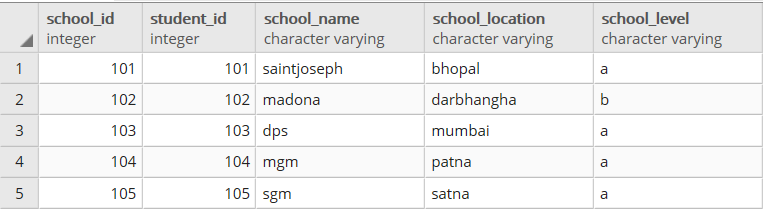
   school_id===================>primary key
   student_id=================>foreign key
===============================================================================

   marks table
   enroll_id===================>primary key
   school_id===================>foreign key
=========================================================================================


SELECT  s.student_fname, s.student_mname, s.student_lname, sc.school_name, sc.school_level,m.marks, m.percentage, m.grade
FROM public.student s cross join school sc  cross join marks m

SELECT  s.student_fname, s.student_mname, s.student_lname, sc.school_name, sc.school_level,m.marks, m.percentage, m.grade
FROM public.student s inner join school sc on (s.student_id=sc.student_id)
inner join marks m on (sc.school_id=m.school_id)

SELECT  s.student_fname, s.student_mname, s.student_lname, sc.school_name, sc.school_level,m.marks, m.percentage, m.grade
FROM public.student s  join school sc on (s.student_id=sc.student_id)
join marks m on (sc.school_id=m.school_id)

SELECT  s.student_fname, s.student_mname, s.student_lname, sc.school_name, sc.school_level,m.marks, m.percentage, m.grade
FROM public.student s right join school sc on (s.student_id=sc.student_id)
right join marks m on (sc.school_id=m.school_id)

SELECT  s.student_fname, s.student_mname, s.student_lname, sc.school_name, sc.school_level,m.marks, m.percentage, m.grade
FROM public.student s left join school sc on (s.student_id=sc.student_id)
left join marks m on (sc.school_id=m.school_id)


SELECT  s.student_fname, s.student_mname, s.student_lname, sc.school_name, sc.school_level,m.marks, m.percentage, m.grade
FROM public.student s, school sc ,marks m where (s.student_id=sc.student_id and sc.school_id=m.school_id)