Sunday, 7 October 2018


                                      Comparable And Comparator Concept in java?
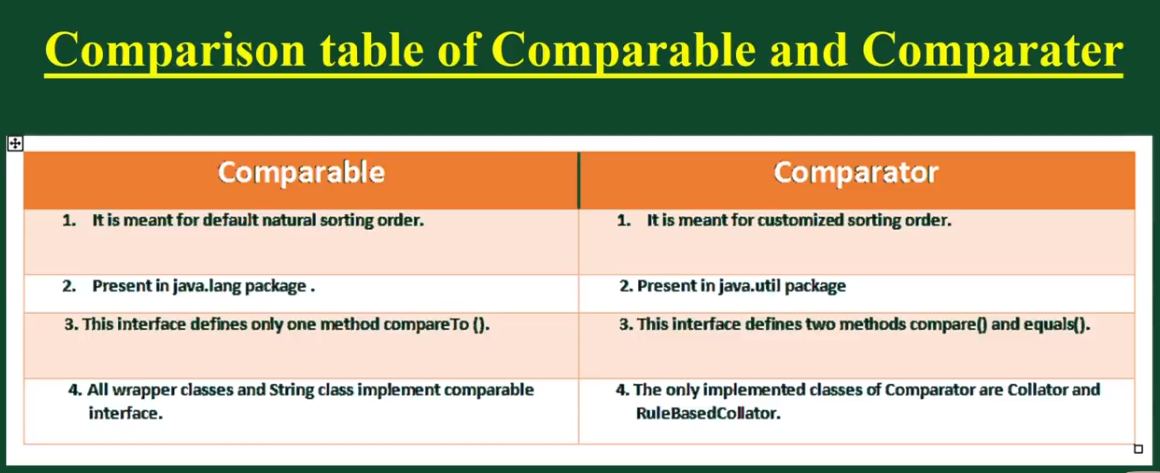


Comparable and Comparator in Java are very useful for sorting collection of objects. Java provides some inbuilt methods to sort primitive types array or Wrapper classes array or list. Here we will first learn how we can sort an array/list of primitive types and wrapper classes and then we will use java.lang.Comparableand java.util.Comparator interfaces to sort array/list of custom classes.


ava provides Comparable interface which should be implemented by any custom class if we want to use Arrays or Collections sorting methods. Comparable interface has compareTo(T obj) method which is used by sorting methods, you can check any Wrapper, String or Date class to confirm this. We should override this method in such a way that it returns a negative integer, zero, or a positive integer if “this” object is less than, equal to, or greater than the object passed as argument.


But, in most real life scenarios, we want sorting based on different parameters. For example, as a CEO, I would like to sort the employees based on Salary, an HR would like to sort them based on the age. This is the situation where we need to use Java Comparator interface because Comparable.compareTo(Object o)method implementation can sort based on one field only and we can’t chose the field on which we want to sort the Object.

Java Comparator

Comparator interface compare(Object o1, Object o2) method need to be implemented that takes two Object argument, it should be implemented in such a way that it returns negative int if first argument is less than the second one and returns zero if they are equal and positive int if first argument is greater than second one.


package govind;

import java.util.ArrayList;
import java.util.Collections;

public class ArrayListTest {
public static void main(String[] args) {
ArrayList<Integer> al=new ArrayList<>();
al.add(10);
al.add(4);
al.add(6);
al.add(3);
al.add(50);
System.out.println("before sorting");
for(int i:al)//autoboxing
{
System.out.println(i);
}

System.out.println("after sorting");
Collections.sort(al);
for(int i:al)//autoboxing
{
System.out.println(i);
}

}


}


o/p:------------------------------------------------

before sorting
10
4
6
3
50
after sorting
3
4
6
10
50


==========================================================================================================================================

package govind;

public class Product {

String pname;
int price;
public Product(String pname,int price) {
super();
this.pname = pname;
this.price = price;
}
@Override
public String toString() {
return "Product [pname=" + pname + ", price=" + price + "]";
}


}


package govind;

import java.util.ArrayList;
import java.util.Collections;

public class ProductList {
public static void main(String[] args) {

ArrayList<Product> productList=new ArrayList<>();
productList.add(new Product("laptop", 45000));
productList.add(new Product("Desktop", 25000));
productList.add(new Product("T.v", 15000));
productList.add(new Product("Mobile", 10000));
productList.add(new Product("Jeans", 1500));
productList.add(new Product("Shirt", 1000));
System.out.println(productList);
//Collections.sort(productList);//error


}

}


o/p:-----------------------


compile time error
Exception in thread "main" java.lang.Error: Unresolved compilation problem:
The method sort(List<T>) in the type Collections is not applicable for the arguments (ArrayList<Product>)

at govind.ProductList.main(ProductList.java:17)
=========================================================================================================================================

Comparable Concept:-------


package govind;

public class ProductComparable implements Comparable<ProductComparable> {

private String pname;
private int Price;
public ProductComparable(String pname, int price) {
super();
this.pname = pname;
Price = price;
}

@Override
public String toString() {
return "ProductComparable [pname=" + pname + ", Price=" + Price + "]";
}


   // if u want to sort on the basis of price
   //@Override
public int compareTo(ProductComparable pricecompare) {
if(Price>pricecompare.Price)
{
return 1;
    }
else if(Price<pricecompare.Price)
{
return -1;
}
else
{
return 0;
}

}


/*if u want to sort on the basis of pname:

@Override
public int compareTo(ProductComparable productName) {

return pname.compareTo(productName.pname);
}*/


}


package govind;

import java.util.ArrayList;
import java.util.Collections;

public class ProductComparableMain {

public static void main(String[] args) {
ArrayList<ProductComparable> productList=new ArrayList<>();
productList.add(new ProductComparable("Laptop", 45000));
productList.add(new ProductComparable("Desktop", 25000));
productList.add(new ProductComparable("T.v", 15000));
productList.add(new ProductComparable("Mobile", 10000));
productList.add(new ProductComparable("Jeans", 1500));
productList.add(new ProductComparable("Shirt", 1000));
System.out.println("Before Sorting");
System.out.println(productList);
System.out.println("After Sorting on the basis of price");
Collections.sort(productList);
System.out.println(productList);
}

}


o/p:-----------------------------------

Before Sorting
[ProductComparable [pname=Laptop, Price=45000], ProductComparable [pname=Desktop, Price=25000], ProductComparable [pname=T.v, Price=15000], ProductComparable [pname=Mobile, Price=10000], ProductComparable [pname=Jeans, Price=1500], ProductComparable [pname=Shirt, Price=1000]]
After Sorting on the basis of price
[ProductComparable [pname=Shirt, Price=1000], ProductComparable [pname=Jeans, Price=1500], ProductComparable [pname=Mobile, Price=10000], ProductComparable [pname=T.v, Price=15000], ProductComparable [pname=Desktop, Price=25000], ProductComparable [pname=Laptop, Price=45000]]


=============================================================================================================================================


Comparator Concept in java:--------------------

package govind;

public class Product {

String pname;
int price;
public Product(String pname,int price) {
super();
this.pname = pname;
this.price = price;
}
@Override
public String toString() {
return "Product [pname=" + pname + ", price=" + price + "]";
}


}


package govind;

import java.util.Comparator;

public class ProductNameComparator implements Comparator<Product>{

@Override
public int compare(Product p1, Product p2) {
return p1.pname.compareTo(p2.pname);
}


}


package govind;

import java.util.Comparator;

public class ProductPriceComparator  implements Comparator<Product>{

@Override
public int compare(Product p1, Product p2) {

return p1.price-p2.price;
}

}


package govind;

import java.util.ArrayList;
import java.util.Collections;

public class ProductListComparator {


public static void main(String[] args) {

ArrayList<Product> productList=new ArrayList<>();
productList.add(new Product("laptop", 45000));
productList.add(new Product("Desktop", 25000));
productList.add(new Product("T.v", 15000));
productList.add(new Product("Mobile", 10000));
productList.add(new Product("Jeans", 1500));
productList.add(new Product("Shirt", 1000));
System.out.println("************ Sorting on the basis of product name****************");
System.out.println("before sorting");
System.out.println(productList);
System.out.println("after sorting");
Collections.sort(productList,new ProductNameComparator());
System.out.println(productList);

System.out.println("************ Sorting on the basis of price****************");
System.out.println("before sorting");
System.out.println(productList);
System.out.println("after sorting");
Collections.sort(productList,new ProductPriceComparator());
System.out.println(productList);
}
}


o/p:----------------------------------------------------------------------------------

************ Sorting on the basis of product name****************
before sorting
[Product [pname=laptop, price=45000], Product [pname=Desktop, price=25000], Product [pname=T.v, price=15000], Product [pname=Mobile, price=10000], Product [pname=Jeans, price=1500], Product [pname=Shirt, price=1000]]
after sorting
[Product [pname=Desktop, price=25000], Product [pname=Jeans, price=1500], Product [pname=Mobile, price=10000], Product [pname=Shirt, price=1000], Product [pname=T.v, price=15000], Product [pname=laptop, price=45000]]
************ Sorting on the basis of price****************
before sorting
[Product [pname=Desktop, price=25000], Product [pname=Jeans, price=1500], Product [pname=Mobile, price=10000], Product [pname=Shirt, price=1000], Product [pname=T.v, price=15000], Product [pname=laptop, price=45000]]
after sorting
[Product [pname=Shirt, price=1000], Product [pname=Jeans, price=1500], Product [pname=Mobile, price=10000], Product [pname=T.v, price=15000], Product [pname=Desktop, price=25000], Product [pname=laptop, price=45000]]


                                                     JAVA-SCRIPT OBJECT 


<!DOCTYPE html>
<html>
<body>

<p>Creating a JavaScript Object.</p>

<p id="demo"></p>

<script>
var employee = {
    firstName : "govind",
    middleName : "ballabh",
    lastName  : "khan",
    age       : 27,
    salary : 10000.00,
    empId:"0105OIST"
};

//Adding New Properties
employee.nationality="english";

//deleting properties
delete employee.age;

document.getElementById("demo").innerHTML = "Full Name="+
employee.firstName + " "+employee.middleName+" "+employee.lastName+" " +"and salary="+employee.salary+" "+"Nationality="+employee.nationality+" "+ "+Age= "+employee.age
</script>

</body>
</html>

o/p:-----------------------------------------------
Creating a JavaScript Object.
Full Name=govind ballabh khan and salary=10000 Nationality=english +Age= undefined

=======================================================================================================================================================================

<!DOCTYPE html>
<html>
<body>

<p>Creating a JavaScript Object with new keyword</p>

<p id="demo"></p>

<script>
var employee = new Object();
    employee.firstName = "govind";
    employee.middleName = "ballabh";
    employee.lastName  = "khan";
    employee.age = 27;
    employee.salary = 10000.00;
    employee.empId ="0105OIST";

    var t=employee;//java script objects are mutable
    employee.age=26;

   
document.getElementById("demo").innerHTML = "Full Name="+
employee.firstName +" "+employee.middleName+" "+employee.lastName+" " +"and age="+employee.age;//access the propery of object ist way

/*
document.getElementById("demo").innerHTML = "Full Name="+
employee.firstName +" "+employee.middleName+" "+employee.lastName+" " +"and EmployeeId="+employee["empId"]; ////access the propery of object 2nd way */


</script>
</body>
</html>

o/p:-------------------------------------
Creating a JavaScript Object with new keyword
Full Name=govind ballabh khan and age=26

============================================================================================================================================

<!DOCTYPE html>
<html>
<body>

<p>Creating a JavaScript Object and function</p>

<p id="demo"></p>

<script>
var employee = {
    firstName : "govind",
    middleName : "ballabh",
    lastName  : "khan",
    age       : 27,
    salary : 10000.00,
    empId:"0105OIST",
   
    fullName : function ()
    {
    return this.firstName+" "+this.middleName+" "+this.lastName;
    }


};


//Adding a Method to an Object
/*employee.name = function() {
    return this.firstName + " "+" "+this.middleName+" " + this.lastName;
};*/

document.getElementById("demo").innerHTML = employee.fullName();


/*document.getElementById("demo").innerHTML ="the employee name is "+ employee.name();*/


/*document.getElementById("demo").innerHTML = employee.fullName;//it will return function definition */
</script>

</body>
</html>

o/p:---------------------------------------------------

Creating a JavaScript Object and method
govind ballabh khan

=========================================================================================================================================

<!DOCTYPE html>
<html>
<body>

<p>Creating a JavaScript Object and used for in loop </p>

<p id="demo"></p>

<script>

var employee = new Object();
    employee.firstName = "govind";
    employee.middleName = "ballabh";
    employee.lastName  = "khan";
    employee.age = 27;
    employee.salary = 10000.00;
    employee.empId ="0105OIST";

    var txt=" ";
    var x;
   
    for(x in employee)
    {
    txt=txt+employee[x]+" "+"<br>";
    }


document.getElementById("demo").innerHTML = txt;

</script>
</body>
</html>


o/p:------------------------------------------------

Creating a JavaScript Object and used for in loop
govind
ballabh
khan
27
10000
0105OIST

==========================================================================================================================================

<!DOCTYPE html>
<html>
<body>

<p>Creating a JavaScript Object with new keyword</p>

<p id="demo"></p>

<script>
var employee = {
    firstName : "govind",
    middleName : "ballabh",
    lastName  : "khan",
    age       : 27,
    salary : 10000.00,
    empId:"0105OIST",
     get employeeId()
     {
      return this.empId;

      //return this.empId.toLowerCase();
     }
     };


document.getElementById("demo").innerHTML = employee.employeeId;


</script>
</body>
</html>


o/p:---------------------------------------------
Creating a JavaScript Object with get method concept
0105OIST

===========================================================================================================================================


<!DOCTYPE html>
<html>
<body>

<p>Creating a JavaScript Object and setter method</p>

<p id="demo"></p>

<script>
var employee = {
    firstName : "govind",
    middleName : "ballabh",
    lastName  : "khan",
    age       : 27,
    salary : 10000.00,
    empId:"0105OIST",
     set sal(value)
     {
       this.salary=value;
     }
     };
 
   employee.sal=11000.00;


document.getElementById("demo").innerHTML = employee.salary;


</script>
</body>
</html>


o/p:-----------------------------------------------------------

Creating a JavaScript Object and setter method
11000

========================================================================================================================================

<!DOCTYPE html>
<html>
<body>

<p>Creating a JavaScript constructor</p>

<p id="demo"></p>

<script>

function employee(first,middle,last,age,sal,id)
{

this.firstName=first;
this.middleName=middle;
this.lastName=last;
this.age=age;
this.salary=sal;
this.empId=id;
}

//create a employee object

var employeeFirst= new employee("govind","ballabh","khan",27,10000.00,"0105OIST");

var employeeSecond= new employee("sanjeet","shankar","jha",25,15000.00,"0106OIST");
   
   
document.getElementById("demo").innerHTML = "employeeFirst salary is="+employeeFirst.salary+" employeeSecond salary="+employeeSecond.salary;


</script>
</body>
</html>
<!DOCTYPE html>
<html>
<body>

<p>You cannot add a new property to a constructor function if u want to add then prototype concept used </p>

<p id="demo"></p>

<script>

function employee(first,middle,last,age,sal,id)
{

this.firstName=first;
this.middleName=middle;
this.lastName=last;
this.age=age;
this.salary=sal;
this.empId=id;
}

//create a employee object

//employee.nationality="english";
employee.prototype.nationality = "English";

var employeeFirst= new employee("govind","ballabh","khan",27,10000.00,"0105OIST");

var employeeSecond= new employee("sanjeet","shankar","jha",25,15000.00,"0106OIST");
   
   
document.getElementById("demo").innerHTML = "employeeFirst salary is="+employeeFirst.salary+" employeeSecond salary="+employeeSecond.salary+" "+"employee nationality ="+employeeFirst.nationality;


</script>
</body>
</html>


o/p:----------------------

You cannot add a new property to a constructor function if u want to add then prototype concept used
employeeFirst salary is=10000 employeeSecond salary=15000 employee nationality =English

                              cloning concept with list


package govind;

public class EmployeeData implements Cloneable {

private String empName;
private String empId;
public EmployeeData(String empName, String empId) {
super();
this.empName = empName;
this.empId = empId;
}
@Override
public String toString() {
return "EmployeeName="+empName+" "+"EmpId="+empId;
}


protected EmployeeData clone()
{
return new EmployeeData(empName, empId);
}


}


========================================================================================================================================


package govind;

import java.util.ArrayList;
import java.util.Arrays;
import java.util.List;
import java.util.stream.Collectors;

public class EmployeeDataList {

public static void main(String[] args) {
List<EmployeeData> original=Arrays.asList(new EmployeeData("govind","0105OIST"),
                                  new EmployeeData("sanjeev","0104RKDF"));
List<EmployeeData> copy=new ArrayList<>(original.size());
for(EmployeeData e:original)
{
copy.add(e.clone());
}

//In java 8
/*List<EmployeeData> copy1 = original.stream().map(EmployeeData::clone).collect(Collectors.toList());
System.out.println("copy1="+copy1);*/

System.out.println("original="+original);
System.out.println("copy="+copy);

}

}


===============================================================================================================================================
o/p:----------------------------------
original=[EmployeeName=govind EmpId=0105OIST, EmployeeName=sanjeev EmpId=0104RKDF]
copy=[EmployeeName=govind EmpId=0105OIST, EmployeeName=sanjeev EmpId=0104RKDF]

Saturday, 6 October 2018


                                      Cloning in java


package govind;

public class CloningConcept implements Cloneable {
int i=10;
int j=20;

public static void main(String[] args) throws CloneNotSupportedException
{
CloningConcept cc=new CloningConcept();
    CloningConcept ccobject = (CloningConcept) cc.clone();
    ccobject.i=888;
    ccobject.j=999;
    System.out.println(cc.i+"  " +cc.j);10 20//it means no changes in original copy
    System.out.println(ccobject.i+" " +ccobject.j);//888 999

}

}

o/p:-----------------

10  20
888 999

====================================================================================================================================


package govind;

public class Cat {

int j;

public Cat(int j) {
super();
this.j = j;
}


}


class Dog implements Cloneable
{ 
Cat c;
int i;
public Dog(Cat c, int i) {
super();
this.c = c;
this.i = i;
}


public Object clone() throws CloneNotSupportedException
{
return super.clone();
}

}


package govind;

public class ShallowCloningExample {

public static void main(String[] args) throws CloneNotSupportedException {
Cat c1=new Cat(20);
Dog d1=new Dog(c1, 10);
Dog d2 = (Dog)d1.clone();
d2.i=888;
d2.c.j=999;
System.out.println(d1.i+"--------"+d1.c.j);//10 999 //in the case of reference variable changing is done inside original copy in shallow cloning
System.out.println(d2.i+"---------"+d2.c.j);//888 999


}

}


o/p:------------------------------------------
10--------999
888---------999


=============================================================================================================================================


package govind;

public class CatClass {


int j;

public CatClass(int j) {
super();
this.j = j;
}


}


class DogClass implements Cloneable
{
CatClass cc;
int i;
public DogClass(CatClass cc, int i) {
super();
this.cc = cc;
this.i = i;
}

public Object clone() throws CloneNotSupportedException
{
CatClass c=new CatClass(cc.j);
DogClass d=new DogClass(c, i);
return d;

}

}


package govind;

public class DeepCloningDemo {
public static void main(String[] args) throws CloneNotSupportedException  {
CatClass cc=new CatClass(20);
DogClass dc1=new DogClass(cc, 10);
System.out.println(dc1.i+" "+dc1.cc.j);//10 20
DogClass dc2 = (DogClass) dc1.clone();
dc2.i=888;
dc2.cc.j=999;
System.out.println(dc1.i+" "+dc1.cc.j);//10 20 original object not changed in deep cloning
System.out.println(dc2.i+" "+dc2.cc.j);//888 999
}
}


0/p:--------------------
10 20
10 20
888 999

Friday, 5 October 2018


                    Remove Duplicate Words from String in java


package govind;

import java.util.Arrays;
import java.util.LinkedHashSet;

public class RemoveDuplicateWords {

public static String removeDuplicateWords(String str)
{
System.out.println("Original String="+str);
String[] strarray = str.split("\\s+");
LinkedHashSet<String> lhs=new LinkedHashSet<>(Arrays.asList(strarray));
StringBuilder sb=new StringBuilder();
int index=0;
for(String s1:lhs)
{
if(index>0)
sb.append(" ");
sb.append(s1);
index++;
}

    str=sb.toString();
System.out.println("After Removing Duplicate Words");
return str ;

}


public static void main(String[] args) {

String removeduplicate = RemoveDuplicateWords.removeDuplicateWords("My name is khan and this khan is my title");
System.out.println(removeduplicate);

}
}

o/p:-----------------------------------------------

Original String=My name is khan and this khan is my title
My name is khan and this my title


==========================================================================================================================================

package govind;

import java.util.Arrays;
import java.util.LinkedHashSet;

public class RemoveDuplicateWordsByShortCut

{
public static String removeDuplicateWords(String str)
{
System.out.println("Original String="+str);
str=new LinkedHashSet<>(Arrays.asList(str.split("\\s+"))).toString().replaceAll("[\\[\\],]", "");
System.out.println(str);
return str;
}
public static void main(String[] args) {
String removeduplicate = RemoveDuplicateWordsByShortCut.removeDuplicateWords("My name is khan and this khan is my title");
System.out.println(removeduplicate);

}
}


o/p:-----------------------------------------------

Original String=My name is khan and this khan is my title
My name is khan and this my title

==============================================================================================================================================


package govind;

import java.util.Arrays;
import java.util.stream.Collectors;

public class RemoveDuplicateWordInJava8 {
public static String removeDuplicateWords(String str)
{
System.out.println("Original String="+str);
str=Arrays.stream(str.split("\\s+")).distinct().collect(Collectors.joining(" "));
return str;

}
public static void main(String[] args) {
String removeduplicate = RemoveDuplicateWordInJava8.removeDuplicateWords("My name is khan and this khan is my title");
System.out.println(removeduplicate);

}
}

o/p:-----------------------------------------------

Original String=My name is khan and this khan is my title
My name is khan and this my title


=============================================================================================================================================


Thursday, 4 October 2018

                                  Factory Design Pattern in java


Factory Pattern is one of the Creational Design pattern and it’s widely used in JDK 
as well as frameworks like Spring and Struts.

Factory design pattern is used when we have a super class with multiple sub-classes and based on input, we need to return one of the sub-class. 
This pattern take out the responsibility of instantiation of a class from client program to the factory class.


Factory Design Pattern Advantages

1. Factory design pattern provides approach to code for interface rather than implementation.

2. Factory pattern removes the instantiation of actual implementation classes from client code. 

3.Factory pattern makes our code more robust, less coupled and easy to extend. For example, we can easily change PC class implementation because client program is unaware of this.

4. Factory pattern provides abstraction between implementation and client classes through inheritance.

Factory Design Pattern Examples in JDK
java.util.Calendar, ResourceBundle and NumberFormat getInstance() methods uses Factory pattern. valueOf() method in wrapper classes like Boolean, Integer etc.

Main goal of Factory design pattern:----------------------------------
Abstraction
Loosely coupled
Removes the burden from client
Easy to extend


//interface Computer

package com.govind.beans;

public interface Computer
{
   public String getRam();
 
   public String getCpu();
 
   public String getHdd();
 
 
}


=============================================================================================================

package com.govind.beans;
//class PC .java

public class PC implements Computer
{

private String ram;
private String hdd;
private String cpu;


public PC(String ram, String hdd, String cpu) {
super();
this.ram = ram;
this.hdd = hdd;
this.cpu = cpu;
}

@Override
public String getRam() {
return this.ram;
}

@Override
public String getCpu() {
return this.cpu;
}

@Override
public String getHdd() {
return this.hdd;
}

}


====================================================================================================================================
//class Server.java
package com.govind.beans;

public class Server implements Computer {
private String ram;
private String hdd;
private String cpu;


public Server(String ram, String hdd, String cpu) {
super();
this.ram = ram;
this.hdd = hdd;
this.cpu = cpu;
}

@Override
public String getRam() {
return this.ram;
}

@Override
public String getCpu() {
return this.cpu;
}

@Override
public String getHdd() {
return this.hdd;
}

}


===================================================================================================================================

package com.govind.beans;

public class SuperComputer implements Computer {

private String ram;
private String hdd;
private String cpu;


public SuperComputer(String ram, String hdd, String cpu) {
super();
this.ram = ram;
this.hdd = hdd;
this.cpu = cpu;
}

@Override
public String getRam() {
return this.ram;
}

@Override
public String getCpu() {
return this.cpu;
}

@Override
public String getHdd() {
return this.hdd;
}
}


===========================================================================================================================================
//enum ComputerType.java

package com.govind.factory;

public enum ComputerType {
PC,SERVER,SUPERCOMPUTER;

}


============================================================================================================================================
//class ComputerFactory .java
package com.govind.factory;
import com.govind.beans.Computer;
import com.govind.beans.PC;
import com.govind.beans.Server;
import com.govind.beans.SuperComputer;

public class ComputerFactory {


public static Computer createComputer(ComputerType type,String ram,String hdd,String cpu)
{
Computer comp=null;
switch(type)
{
case PC:
comp=new PC(ram, hdd, cpu);
break;
case SERVER:
    comp=new Server(ram, hdd, cpu);
    break;
    case SUPERCOMPUTER:
    comp=new SuperComputer(ram, hdd, cpu);
    break;
}
return comp;
}
}


===========================================================================================================================================

package com.govind.clientmainprog;
import com.govind.beans.Computer;
import com.govind.factory.ComputerFactory;
import com.govind.factory.ComputerType;

public class ComputerClientProgram {

public static void main(String[] args) { Computer pc = ComputerFactory.createComputer(ComputerType.PC, "2gb", " 500gb", "i3 processor");
Computer server = ComputerFactory.createComputer(ComputerType.SERVER, "8gb", "2tb", "i7 processor");
 Computer supercomputer = ComputerFactory.createComputer(ComputerType.SUPERCOMPUTER, "50gb", "50tb", "i10 processor");
       System.out.println(pc.getRam()+" "+pc.getHdd()+" "+pc.getCpu());
       System.out.println(server.getRam()+" "+server.getHdd()+" "+server.getCpu());
       System.out.println(supercomputer.getRam()+" "+supercomputer.getHdd()+"                     "+supercomputer.getCpu());
   

}

}

================================================================================================================================================


o/p:----------------------------------------------------------------------


2gb  500gb i3 processor
8gb 2tb i7 processor
50gb 50tb i10 processor

Monday, 1 October 2018

                                                       JVM ARCHITECTURE IN JAVA

A Virtual Machine is a Software implementation of a Physical Machine, Java was developed with the concept of WORA ( Write Once Run Anywhere ) which runs on a VM. The compiler will be compiling the java file into a java .class file.  The .class file is input to JVM which Loads and executes the class file. Below goes the Architecture of JVM.

How JVM works in Java ?
As shown in the above architecture diagram JVM is divided into three main subsystems

Class Loader Subsystem
Runtime Data Area
Execution Engine


1. Class Loader Subsystem
Java’s dynamic class loading functionality is handled by the class loader subsystem. It loads, links and initializes the class when it refers to a class for the first time at runtime, not at compile-time. It performs three major functionality such as Loading, Linking, and Initialization.

1.1 Loading
Classes will be loaded by this component. BootStrap ClassLoader, Extension ClassLoader, Application ClassLoader are the three class loader which will help in achieving it.


BootStrap ClassLoader – Responsible for loading classes from the bootstrap classpath, nothing but rt.jar. Highest priority will be given to this loader.

Extension ClassLoader – Responsible for loading classes which are inside ext folder (jre\lib)

Application ClassLoader –Responsible for loading Application Level Classpath, path mentioned Environment Variable etc.

The above Class Loaders will follow Delegation Hierarchy Algorithm while loading the class files.

1.2 Linking


Verify – Bytecode verifier will verify whether the generated bytecode is proper or not if verification fails we will get verification error
Prepare – For all static variables memory will be allocated and assigned with default values.
Resolve – All symbolic memory references are replaced with the original references from Method Area.

1.3 Initialization
This is the final phase of Class Loading, here all static variable will be assigned with the original values and static block will be executed.

2. Runtime Data Area
Runtime Data Area is divided into 5 major components

Method Area – All the Class level data will be stored here including static variables. Method Area is one per JVM and it is a shared resource.

Heap Area – All the Objects and its corresponding instance variables and arrays will be stored here. Heap Area is also one per JVM since Method area and Heap area shares memory for multiple threads the data stored is not thread safe.

Stack Area – For every thread, a separate runtime stack will be created. For every method call, one entry will be made in the stack memory which is called as Stack Frame. All local variables will be created in the stack memory. Stack area is thread safe since it is not a shared resource. Stack Frame is divided into three sub-entities such as

Local Variable Array – Related to the method how many local variables are involved and the corresponding values will be stored here.

Operand stack – If any intermediate operation is required to perform, operand stack act as runtime workspace to perform the operation.

Frame data – All symbols corresponding to the method is stored here. In the case of any exception, the catch block information will be maintained in the frame data.

PC Registers – Each thread will have separate PC Registers, to hold address of current executing instruction once the instruction is executed the PC register will be updated with the next instruction

Native Method stacks – Native Method Stack holds native method information. For every thread, separate native method stack will be created.


3. Execution Engine
The bytecode which is assigned to the Runtime Data Area will be executed by the Execution Engine. The Execution Engine reads the byte code and executes one by one.

Interpreter – Reads the bytecode, interprets it and executes it one by one. The interpreter interprets the bytecode faster but executes slowly. The disadvantage of the interpreter is that when one method called multiple times, every time interpretation is required.

JIT Compiler – JIT Compiler neutralizes the disadvantage of the Interpreter ( a single method called multiple times, each time interpretation is required ), The Execution Engine will be using the help of Interpreter in converting but when it found repeated code it uses JIT compiler which compiles the entire bytecode and changes it to native code.  This native code will be used directly for repeated method calls which improve the performance of the system.
Intermediate Code generator – produces intermediate code

Code Optimizer – Code Optimizer is responsible for optimizing the intermediate code generated above

Target Code Generator – Target Code Generator is responsible for Generating Machine Code/ Native Code

Profiler – Profiler is a special component, it is responsible for finding the hotspots (i.e) Used to identify whether the method is called multiple time or not.

Garbage Collector : Garbage Collector is a part of Execution Engine, it collects/removes the unreferenced objects. Garbage Collection can be triggered by calling “System.gc()”, but the execution is not guaranteed. Garbage collector of JVM collects only those objects that are created by new keyword. So if you have created any object without new, you can use finalize method to perform cleanup.

Java Native Interface (JNI):  JNI will be interacting with the Native Method Libraries and provides the Native Libraries required for the Execution Engine.

Native Method Libraries : It is a Collection of the Native Libraries which is required for the Execution Engine.